Access Folders2.11
Publisher Description
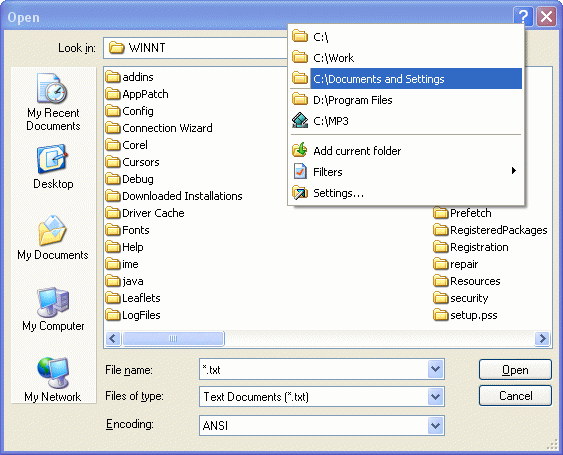
Access Folders is a fine Windows enhancement that keeps all of your directories and sub-directories within easy reach. The program integrates into Windows' standard Save As/Open dialogs which are used by most applications. By right-clicking the question mark (?) button at the top-right hand side of this window, the program's menu pops-up to provide access to favorite folders. You can select a folder and the dialog will immediately jump to the directory.
Access Folders really offers a number of uses. First, it lets you directly save important files to folders on local or network drives without all of the repetitive clicking. Second, it never lets you forget where these files are saved, especially those that have been downloaded from the Internet or edited in Office applications.
Access Folders couldn't be any easier to set up. You can open the program's options menu by right-clicking its icon in the system tray. It's here where you can conveniently add and remove folder or sub-folder paths. The program can also integrate into Explorer's shell context menu, allowing you to quickly add folders with a right-click. You can also define file filters which will be applied to your Open/Save dialogs. Other options include the ability to have Access Folders loaded at every Windows startup, using mouse wheel to access the menu, assigning hotkeys and much more.
About Access Folders
This File & Disk Management program is available in English, Dutch, French, Russian. It was last updated on 29 September, 2026. Access Folders is compatible with the following operating systems: Windows.
The company that develops Access Folders is Shelltoys Inc.. The latest version released by its developer is 2.11. This version was rated by 4 users of our site and has an average rating of 2.8.
The download we have available for Access Folders has a file size of 1.0 MB. Just click the green Download button above to start the downloading process. The program is listed on our website since 2003-01-03 and was downloaded 794 times. We have already checked if the download link is safe, however for your own protection we recommend that you scan the downloaded software with your antivirus. Your antivirus may detect the Access Folders as malware if the download link is broken.
How to install Access Folders on your Windows device:
- Click on the Download button on our website. This will start the download from the website of the developer.
- Once the Access Folders is downloaded click on it to start the setup process (assuming you are on a desktop computer).
- When the installation is finished you should be able to see and run the program.
